October 2, 2010
10:00 - 12:00
In 1991, Linus Torvalds, a young student of Helsinki University in Finland released the first version of Linux kernel on PCs. Since Linux is an open source system, it grew to be a powerful and competitive operating system in PCs, MACs and even some brand name workstations. In the following paragraphs, we would like to briefly introduce UNIX and LINUX.
| Year | |
| 1969 | Unics, by Ken Thompson at Bell Laboratory, runs on Digital Equipment PDP-7 |
| Multics, developed by Bell, MIT and General Electric | |
| 1970 | Unics moved to PDP-11/20 |
| Ritchie designed and wrote first C compiler for UNIX | |
| 1973 | Ritchie and Thompson rewrote UNIX kernel in C |
| 1975 | Sixth Edition (V6) was released |
| 1978 | first version of BSD was built by Bill Joy, University of California, Berkeley (UCB). |
| 1979 | Seventh Edition (V7) was released and implemented on DEC PDP-11, the Interdata 8/32, and the VAX. |
| first VAX version of BSD (3BSD) was released | |
| 1980 | Bill ported the 32V version of UNIX to DEC's VAX machine |
| 4BSD was released | |
| 1981 | 4.1BSD was released |
| 1983 | System V developed by AT&T based on V7 was first released |
| 4.2BSD was released | |
| 1984 | AT&T start market UNIX hardware and software System V release 2 |
| X was developed by MIT as part of Project Athena | |
| 1986 | System V release 3 |
| 1987 | 4.3BSD was released |
| 1988 | BSD Networking Release 1 |
| X Consortium was formed. The aim is to formulate the generally accepted standard in X | |
| 1989 | System V release 4 (SVR4) largely written by SUN Microsystems, included many features in BSD |
| 1990 | AT&T established UNIX System Laboratory (USL) for marketing System V and handle license and further development |
| 1991 | BSD Networking Release 2, led to development of 386BSD |
| 1991 | Linus Torvalds released Linux version 0.2 |
| 1993 | USL was acquired by Novell. Novell gave the UNIX trademark to X/Open. Novell add NetWare support to System V |
| 1993 | Slackware, the oldest linux distribution was first released Debian project was established |
| 1994 | Linux kernel version 1.0 released RedHat and SUSE published version 1.0 of their Linux distributions |
| 1995 | Linux is ported to DEC alpha and to Sun SPARC |
| 1996 | Linux Kernel 2.0 was released. It supported multi-CPU. |
| 1998 | Major companies like IBM, Compaq and Oracle announce their support to Linux. The Graphical Environment KDE began development. |
| 1999 | The Graphical Environment GNOME began development. |
| 2003 | Linux kernel 2.6 released on 18 December, 2003. |
| 2004 | XFree86 team splited up and joins the existing X Windows standards body to form the X Org Foundation. |
| 2005 | The project OpenSUSE begins a free distribution from Novell's community. The OpenOffice.org project introduced version 2.0. |
Commercial UNIX based on BSD
Free UNIX
Since Linus only develop the Linux kernel, to make Linux a popular operating system nowadays, the contribution of GNU software pay an important role. The GNU project was started in 1984 by Richard Stallman who would like to develop free software. The decision of Linux development under GNU public license accelerated the growth of GNU project after Linux was released in 1991. Some GNU software even develop on Linux platform first before it will be ported to other platform.
At the same year, the Internet grew and became a solid ground for collaborating work by volunteerer all over the world.
Many distribution of Linux was released on different hardware such as PCs, PowerPC, Macintosh and even brand name UNIX. Though Linux kernel is free and open source, these distribution may not be free since the software packaged may include some commercial software. A list of linux distribution can be found in the following paragraph or in http://www.linux.org
Red Hat Linux release 7.0 (Guinness)
Kernel 2.2.16-22 on an i686
login:
Type in your username and press ENTER, then a password prompt will appear, type in the correct password (which will not be echoed). A command prompt will be appeared. The prompt character differs from different shells which will be discussed in detail in section 4. You can change your password by typing passwd.
The following show a file, stafflist, 34 bytes in size, which last modified on 19/09/97. It is owned by a user called morris which is a staff of the Dean's Office.
-rw-rw-r-- 1 morris dean 34 Sep 19 1997 stafflistThe ownership can be changed by the command chown and chgrp,
    chown cwyeung stafflist
    chgrp math_stf stafflist
The first field in the above example represents the permission bits of the
files. The first column shows its kind, `d' represent a directory, `-'
represent a regular file. The rest can be divided into 3 groups showing its
user permission, group permission and other permission respectively.
Each group can have read (r), write (w) and/or executable(x) permission bits.
A `-' deny the corresponding permission of the file. Refer to the last example, stafflist is a regular file which can be updated (rw- in user bit and group bit) by morris and dean staff. It can be read by other users (r-- in other bit). Unfortunately, the file cannot be executed by any body since a `-' is found in each executable bit.
One can change the permission bit by using chmod, two methods can be used.
    chmod g-rw,o-r stafflist    - deny rw permission for users in same group
                                - deny r permission for other users
    chmod a+x stafflist         - add executable permission to all users
chmod 700 stafflist - same effect as the above
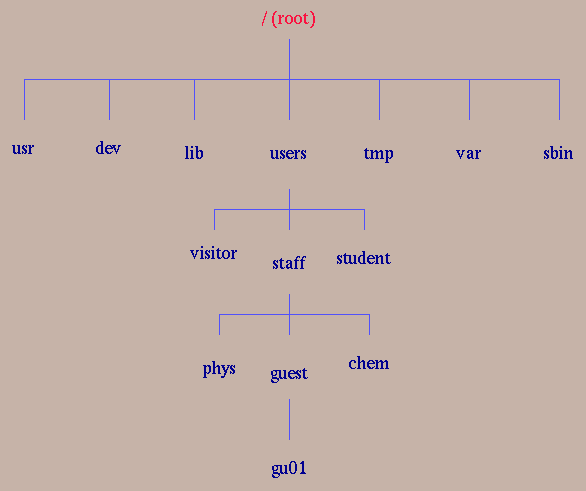
/users/staff/guest/gu01/sampledir/sample.txt
Relative path is the path describe from the current working directory(.) .
sampledir/sample.txt
refer to the same file when gu01's current working directory is
/users/staff/guest/gu01. Use pwd to find the current
working directory.
In path definition, current directory can be described by `.'. Parent
directory can be described by `..'. Home directory can be described by
`~' or the environmental variable '$HOME'.Different shells can be found in Linux. The most common shells are Bourne Again Shell (bash), Bourne (sh, old and standard), Korn (ksh, the default), C (csh, C like command) shell. These shell support both foreground and background processes, pipes, filters and other standard features in Linux. Besides handling Linux commands, these shells support the executions of batch files called shell scripts.
The default shell prompt for the Bourne again, Bourne and Korn shells are ($) and that for the C shell is (%). Under the shell prompt, Linux command can be entered for processing.
A typical command line has the following syntax,
command [-options] arg1 arg2 arg3 ...
where arg1, arg2, arg3, etc. are argument input based on
the nature of the commands. Built-in command are interpreted directly. If the command contains a path, the shell will only search for the command in the path. If no path is declared, the shell will find in the search path (PATH) for the command.
   vi      (standard Linux full-screen editor)
   emacs   (macro reach)
   pico/nano    (command driven full-screen editor)
   joe     (word star like editor)
Since all UNIX systems have installed vi editor, UNIX experts learn vi. Emacs editor are reached in macro for formatting text. Therefore, it is good for program developer to write code in different programming languages. Pico, nano and joe editor support full screen and cursor editing. They are good for novices.
X-window editors are editors which support window and mouse editing. Xemacs and AsWedit are two examples.
Public domain software are often packaged in C source codes and therefore, C compiler is essential to all UNIX/Linux platform.
All other programming language, such as Fortran, C++ and Pascal, have implemented in UNIX/Linux. Compilation of such program need specfic compilers. The command for compilation are as follows,
cc [-o a.exe] a.c
Without -o option, the executable file will be named as a.out.
f77 [-o t1] a.f
the name of the executable can be set freely.
g++ [-o t1] a.C
nohup abc &
Back to Content
After running ftp in windows XP, a ftp prompt will appear
ftp>
First, connect to a remote host by typing open hostname,
ftp> open net1.hkbu.edu.hk
then, type in your username and password.If success, the ftp prompt will be appeared.
The following command will be useful to search and locate your file and subdirectory.
      ls                list directory content
      ls *.c            show all C files
      cd sci            change directory to sci in remote host
      lcd a:            change directory to the floppy drive in local PC
the following commands help file transfer
      bin               prepare to transfer in binary mode
      ascii             prepare to transfer in text mode
      prompt            toggle prompt for file transfer
      get abc.txt       download abc.txt from remote host to local PC
      mget *.txt        download all files end with .txt to local PC
      put mail.txt      upload mail.txt from local PC to remote host
      mput *.mat        upload all files end with .mat to remote host
Back to content
man ls
which list out the man page of the command 'ls'.
man -k file
will list out all commands related to the keyword `file'.
The following commands are categorized by its function and sorted in alphabetical order for easy reference. However, the detail description of the command line are skipped. You should refer to their man page for usage.
| cat | cat f1 f2 | type the content of file f1 and f2 |
|---|---|---|
| cd | cd HOME | change to home directory |
| cp | cp f1 f2 dir1 | copy file f1 and f2 into directory dir1 |
| ls | ls -la | list all files (including hidden) in long format |
| mkdir | mkdir abc | make new directory |
| more | more a1 a2 | list out files a1, a2 in pages |
| mv | mv f1 dir1 | move/rename file f1 into dir1 |
| pwd | pwd | display current working directory |
| rm | rm -rf lab1 | delete all files in lab1 without confirmation |
| rmdir | rmdir lab1 | delete an empty directory |
| cal | cal 11 2010 | display the calendar of November, 2010 |
|---|---|---|
| compress | compress file1 | form a compress file file1.Z |
| date | date | display the current time and date |
| df | df | list information of space used in the system |
| diff | diff f1 f2 | compare text between two files |
| du | du | summarized disk usage of your home directory |
| find | find ./ -name .cshrc -print | search and print the file .cshrc |
| grep | grep student * | search all files with the word student |
| history | history 50 | find the last 50 commands stored in the shell |
| hostname | hostname | display the name of the current machine |
| kill | kill -9 2036 | terminate the process with pid 2036 |
| logout | logout | leave the systems |
| lpr | lpr -h f1 f2 | print f1, f2 without header page |
| mail morris < /tmp/soft.list | send /tmp/soft.list to morris | |
| man | man tar | displaying the manual page on-line |
| nohup | nohup runmatlab a | run matlab (a.m) without hang up after logout |
| passwd | passwd | change password |
| ps | ps -ef | find out all process run in the systems |
| sort | sort -r -n studno | sort studno in reverse numerical order |
| tar | tar cvf abc.tar abc | create archive file |
| uncompress | uncompress file1.Z | the opposite of compress |
| wc | wc -l f1 | count the number of lines in f1 |
| who | who | who is on-line |
| whoami | whoami | identify yourself |
| write | write morris | sends message to morris on the same host |